
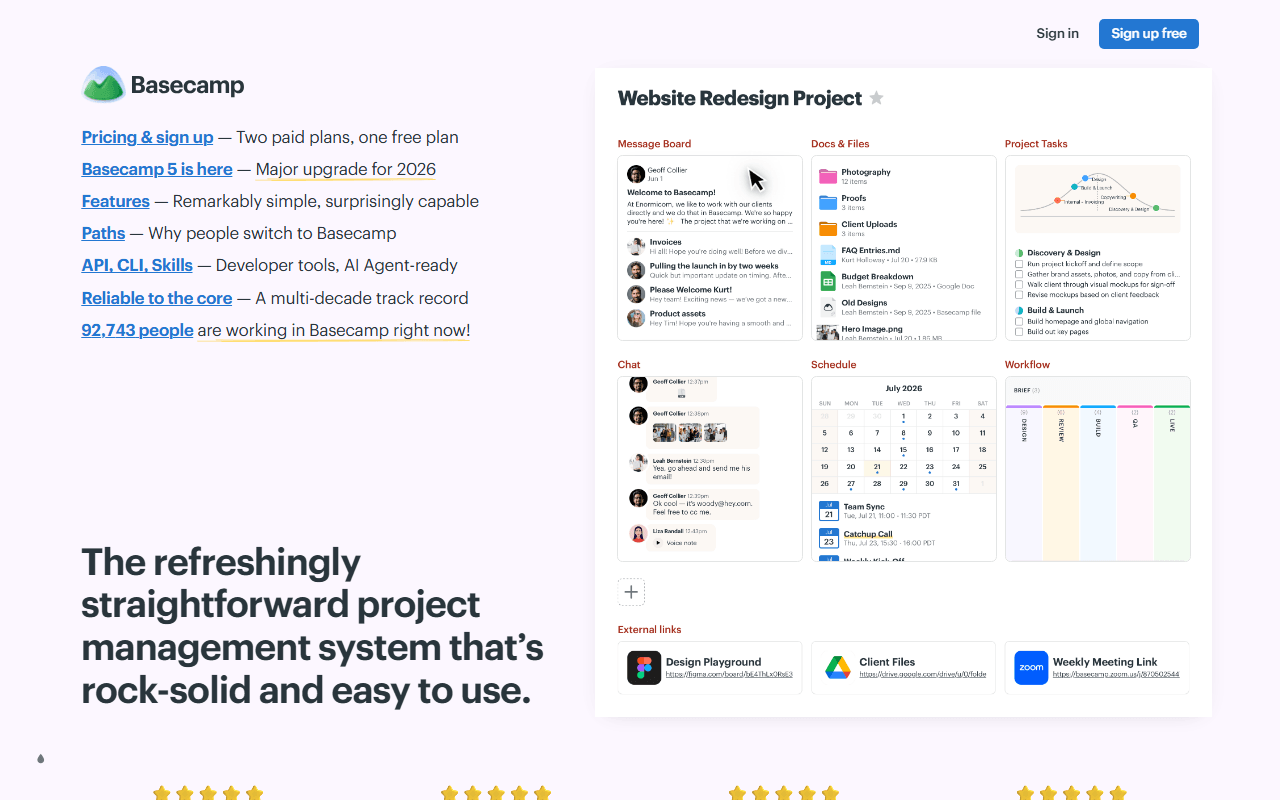

Every Basecamp project is the same seven tools
Basecamp is 37signals' all-in-one team workspace, and its unit is the project. Open one and you get the same fixed set every time: a message board, to-dos, card tables (their take on kanban), Campfire chat with direct Pings, a schedule, docs and files, and reports with automatic check-ins. There is nothing to assemble and no view to configure. The pitch is consolidation, one bill instead of four.
That fixed shape is why people either settle in or leave. 37signals has been in business since 1999, is privately held and bootstrapped, and practises a kind of feature restraint that is rare in this category. Basecamp 5 arrived as "all new for 2026" with what the company calls well over 100 significant improvements, including a new home screen, live-filtering search, global and project calendars, Markdown and tables in docs, voice notes, and subtasks for to-dos, whose long absence had been a standing complaint.
The teams 37signals built this for
- Small agencies and client-services teams who want clients inside the tool without paying for their seats
- Teams tired of running chat in one app, docs in another and tasks in a third
- Organisations of roughly 20 people or more, where one flat monthly fee beats a per-seat bill
- Anyone who wants fewer options rather than more, and will not miss a Gantt chart
Free for one project, then $15 a seat or a flat price of $299
Basecamp is freemium with an unusual twist: the free plan is capacity-gated rather than feature-gated. 37signals states that the same core features are included with every package, from Free to Pro Unlimited, so what money buys is projects, storage and seats rather than capability. As of July 2026, Free covers 1 project, up to 20 users and 1 GB of storage, permanently, with no trial period and no credit card. Pro is $15 per user per month billed monthly, with unlimited projects, 500 GB and a 30-day trial. Pro Unlimited is a flat $299 per month billed annually, with unlimited projects, unlimited users, 5 TB and a 60-day trial. Flat and per-seat meet at exactly 20 people.
The history is worth knowing before you plan around any of it, because this free plan has been taken away before. In May 2022 the free tier ran 3 projects for 20 users. From February 2023 until December 2024 there was no free plan at all, just two paid plans with a 30-day trial. It returned on 23 December 2024 at one project. Today it is real and permanent, and it is a third of the size it was in 2022.
Two pricing details change the maths more than the headline numbers do. Clients and contractors are free on paid plans, since 37signals bills only employees and full users. And the add-ons are flat rather than per-seat: Timesheet, the Admin Pro Pack and an extra terabyte of storage are $50 a month each on Pro, with the first two included in Pro Unlimited.
The one-project limit, and why a second means deleting the first
The free plan's cap is not a soft counter. 37signals puts it plainly: you can only run one project at a time on the Free package, and in order to start a new one, you must delete the current one. There is no archive to move it to. The other number is 1 GB of storage, which is tight for a product that sells Docs & Files as one of its seven tools (as of July 2026). Public sharing links are excluded from Free, and the paid add-ons cannot be bought on a free account at all.
Three limits are not free-plan limits and will follow you up the ladder. There are no Gantt charts, no advanced analytics and no bulk export at any price, which is a product decision rather than an upsell, but it is the decision most likely to hurt someone migrating from Jira or Asana. Time tracking exists only as that $50-a-month Timesheet add-on. And there is no Linux desktop app and no self-hosted edition, so Basecamp runs in a browser or in the Windows, macOS, iOS and Android apps and nowhere else. One further note we hold lightly: a small number of Trustpilot reviewers describe the Basecamp 5 migration as disruptive, but that is a tiny sample from a page we could not read directly, so we report it rather than weigh it.
Where we would send a team with two projects
Stay on the free plan if your team has exactly one thing to run and no more than 20 people on it, because inside that project you get the entire product, which almost nothing else in this category gives away. Leave if you manage projects in the plural, because the only route to a second one is deleting the first, and that is a wall rather than a nudge. On the paid side Basecamp gets better as you grow rather than worse: the flat $299 a month matches 20 seats at $15 and beats them from person 21 onward, and clients and contractors never count. If the one-project cap is what sent you looking, our free Basecamp alternatives list starts with the tools that never count projects at all, and best free project management tools ranks the wider category.
Reader reviews
What people who actually use Basecamp think of it.
No reviews of Basecamp yet. If you have used it, yours would be the first.
The useful part is the specifics: what you used it for, and where it got in your way.
Loading...